
Box themes
The Boxzilla Theme Pack add-on gives you ready-made styles for your boxes and pop-ups. This page shows the themes included in the add-on, using the same centered box position for each example.
Use the links below to open each theme. The content is intentionally simple, so you can focus on the visual style of the box.
Applying a theme is a one-click setting when editing a box in WordPress. You can still combine the theme with your own content, colors, position, triggers, and display rules.
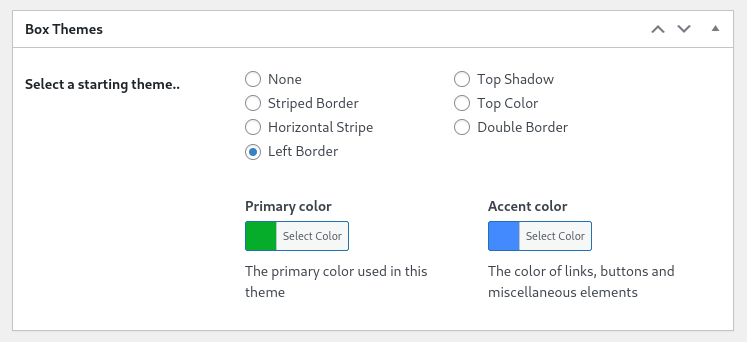
Themes included in the Theme Pack
The Theme Pack is useful when you want a polished box design without writing custom CSS. Each theme gives your box a different visual style while keeping the same Boxzilla behavior.
Please note that the Theme Pack add-on is available for users on a premium plan.
Top Shadow
The Top Shadow theme adds a strong shadow near the top of the box. It gives the box more depth and helps it stand out from the page.
Use this theme when you want a clean design with a little more visual weight.
Striped Border
The Striped Border theme adds a patterned border around the box. It creates a more decorative style than a plain border.
Use this theme for announcements, promotions, or calls to action that can feel a little more playful.
Top Color
The Top Color theme adds a colored bar to the top of the box. This makes the box easy to scan and gives you a clear place to reinforce your brand color.
Use this theme when you want a simple design that still feels branded.
Horizontal Stripe
The Horizontal Stripe theme adds a bold horizontal accent across the box. It draws attention without changing the layout of your content.
Use this theme for short messages, discount codes, or email signup prompts.
Double Border
The Double Border theme frames the box with two border lines. It has a more classic and structured look than the other themes.
Use this theme when you want the box to feel formal, clear, or separate from the rest of the page.
Left Border
The Left Border theme adds a strong vertical accent to the side of the box. It works well for notices, tips, and messages that should feel connected to the page content.
Use this theme when you want a subtle design that still guides the visitor’s eye.
Combine themes with positions and animations
Themes only control how the box looks. You can combine them with any box position, animation, trigger, and display rule.
For example, a Top Color theme can work well as a centered signup box, while the Left Border theme can work well as a bottom-corner notice.
Want to compare layout options? See the demo for available box positions.