
Exit Intent
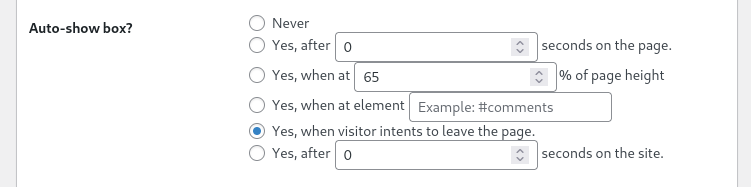
Boxzilla’s Exit Intent add-on lets you show a box when a visitor appears ready to leave the page. This gives you one last chance to show a useful message, offer, signup form, or reminder before they go.
On desktop screens, exit intent is usually detected when the visitor moves their mouse toward the browser bar, close button, or back button. Try moving your mouse toward the top of the browser window to trigger the demo box on this page.
What exit intent is useful for
Exit intent works best for messages that are helpful at the end of a visit. Instead of interrupting someone while they are reading, the box appears when they are already leaving.
Use it for:
- Newsletter signup forms
- Discount codes
- Lead magnets
- Abandoned checkout offers
- Contact prompts
- Reminders about useful content
- Last-minute announcements
A better time to ask
Timing matters. A visitor who is still reading may not be ready for a pop-up. A visitor who is leaving has already decided to move on, so a well-timed message can be less disruptive.
For example, you can show a discount before someone leaves a pricing page, or offer a downloadable guide before they leave a blog post.
Keep the message focused
Exit intent boxes work best when the message is short and specific. The visitor is already on their way out, so this is not the place for a long explanation.
Use a clear headline, a short sentence, and one obvious action. If the offer is useful, the visitor should understand it within a few seconds.
Combine exit intent with Boxzilla rules
The Exit Intent add-on works together with Boxzilla’s normal box settings. You can combine it with custom content, box themes, animations, positions, and display rules.
For example, you can show an exit intent box only on selected pages, only after a visitor has spent enough time on the site, or only when they have not already seen the same message.
Try the demo
Move your mouse toward the address bar, back button, or close button to trigger the exit intent box.
Please note that exit intent behavior is most noticeable on desktop devices with a mouse or trackpad. Mobile visitors do not use a cursor, so exit behavior works differently there.
Want to explore more display options? See the demos for box positions and box animations.